
Why Your Bitaxe Miner Shows “Voltage Protection” — Common Causes and Troubleshooting Steps
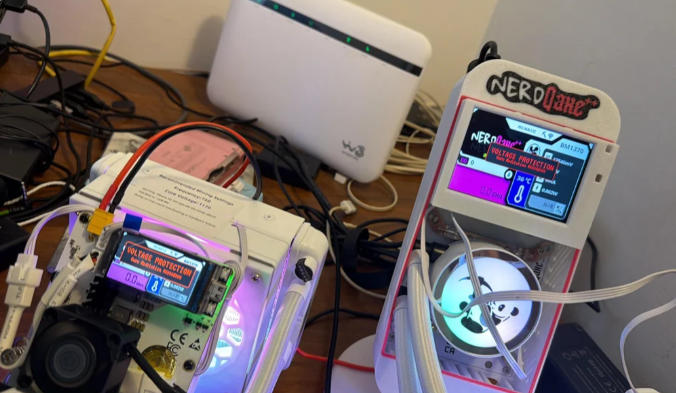
For many home Bitcoin miners, seeing a “Voltage Protection” warning on a Bitaxe-style miner can be confusing. The device may power on, the screen may still work, and the fan may spin, but mining does not continue normally.
This does not always mean the miner is completely dead. In many cases, voltage protection is a safety response. The device is detecting an unstable or unsafe power condition and stopping operation to protect the hardware.
Below are the most common reasons a Bitaxe, NerdQaxe, or similar Bitcoin home miner may show a voltage protection warning, and what you should check before assuming the hash board has failed.
What Does “Voltage Protection” Mean?
“Voltage Protection” usually means the miner has detected a power-related condition outside the expected operating range.
This may involve:
- Input voltage dropping too low under load
- Unstable power delivery
- Poor cable or connector contact
- Power supply limitations
- Damaged voltage regulators
- Incorrect tuning settings
- Heat-related instability
- Short circuit or component-level failure
In simple terms, the miner is trying to protect itself before a worse hardware failure occurs.
For small Bitcoin miners, stable power matters just as much as hashrate. A device may look normal at idle, but once hashing starts, the power demand changes. If the power supply or power path cannot handle that load, voltage protection may be triggered.
1. Check the Power Supply First
When two different miners show the same voltage protection problem, the first thing to check is usually not the hash board. It is the power path.
A power supply can appear normal when the miner is idle. The screen may turn on, LEDs may light up, and the fan may spin. But when the miner starts hashing, current demand increases. If the power supply cannot provide stable output under load, voltage may drop and trigger protection.
Before replacing components, test the miner with a known-good power supply that has enough current headroom.
A good test should include:
- Using a reliable power adapter
- Making sure the voltage rating matches the miner’s requirement
- Avoiding cheap or unknown power supplies
- Checking whether the issue appears only when mining starts
- Testing with another compatible PSU if available
For Bitcoin home mining hardware, power stability is not optional. It is one of the most important parts of long-term reliability.
2. Inspect the Power Cable and Connector
The power supply may be fine, but the problem can still come from the cable or connector.
Loose contacts, oxidized connectors, poor solder joints, or low-quality cables can create resistance in the power path. Under load, this can cause voltage drop or heat buildup.
Check the following:
- Is the power connector loose?
- Is the cable too thin or damaged?
- Does the connector feel hot after running?
- Are there burn marks, discoloration, or melted plastic?
- Is the input socket firmly attached to the board?
- Are there any broken solder joints near the power input?
A small miner may not look power-hungry compared with a large ASIC machine, but unstable cable contact can still cause real problems.
3. Measure Voltage Under Load, Not Only at Idle
One common mistake is measuring voltage only when the miner is powered on but not hashing.
That test is incomplete.
Voltage should be checked while the miner is actually running under load. A PSU may show normal voltage at idle, then dip when the ASIC starts hashing.
If you have the tools and experience, measure the input voltage while the miner is operating. If voltage drops significantly under load, the power supply, cable, or connector may be the cause.
If you are not comfortable measuring live electronics, do not risk damaging the device or injuring yourself. Use a known-good power supply and cable as a safer first test.
4. Reset to Conservative Settings
Overclocking, high frequency settings, aggressive voltage settings, or unstable firmware configuration can also trigger protection behavior.
Before assuming hardware failure, return the miner to conservative settings.
Recommended checks:
- Reset frequency to default or lower
- Avoid overclocking during troubleshooting
- Use stable firmware settings
- Reboot after changing configuration
- Test stability for several hours
- Monitor temperature and hashrate behavior
If the miner only fails under aggressive settings, the issue may be tuning-related rather than a permanent hardware fault.
For home Bitcoin mining, stable operation is usually more important than pushing the highest possible hashrate.
5. Watch When the Error Appears
The timing of the voltage protection warning can tell you a lot.
If the Error Appears Immediately
Possible causes include:
- Bad power supply
- Wrong voltage input
- Short circuit
- Damaged voltage regulator
- Bad connector
- Failed component
If the Error Appears After a Few Minutes
Possible causes include:
- Heat-related instability
- Power supply voltage drop under load
- Poor airflow
- Weak cable connection
- Unstable overclocking settings
If the Error Appears Randomly
Possible causes include:
- Intermittent connector contact
- Unstable AC power
- Poor PSU quality
- Loose cable
- Firmware instability
- Thermal cycling
Do not only look at the error message. Look at the pattern.
6. Check Cooling and Temperature
Although the warning is about voltage, heat can still be part of the problem.
Electronic components behave differently as temperature rises. Voltage regulators, connectors, and ASIC chips can become unstable if cooling is poor or airflow is blocked.
Check:
- Is the fan spinning properly?
- Is airflow blocked by cables?
- Is dust building up around the heatsink?
- Is the miner placed in a hot or enclosed area?
- Does the issue appear only after the device warms up?
A stable Bitaxe-style miner needs both stable power and stable cooling.
7. Inspect the Voltage Regulators
If the power supply, cable, connector, and settings are all confirmed good, then the issue may be on the board itself.
Voltage regulators are critical because they convert input power into the correct voltages required by the ASIC and other components. If a regulator is damaged, unstable, poorly soldered, or overheating, voltage protection may appear.
Signs of possible regulator-related issues include:
- Repeated voltage protection even with a known-good PSU
- Visible damage around the regulator area
- Abnormal heat from one component
- Miner works briefly, then shuts down
- Voltage readings are unstable
- Problem remains after firmware reset
At this point, repair may require electronics experience. If the miner is under warranty, contact the seller before attempting component-level repair.
8. Do Not Keep Power Cycling Repeatedly
If your miner keeps showing voltage protection, do not repeatedly power cycle it without troubleshooting.
Repeatedly forcing the device to start may increase the risk of damaging components, especially if the root cause is a bad power supply, unstable connector, or regulator issue.
A better approach is:
- Power off the miner.
- Let it cool down.
- Check the power supply and cable.
- Reset to conservative settings.
- Test again with a known-good PSU.
- Observe when the warning appears.
Troubleshooting should be systematic, not random.
Quick Troubleshooting Checklist
If your Bitaxe-style miner shows “Voltage Protection,” check the following:
- Try a known-good power supply.
- Use a different power cable.
- Check the power connector for looseness or heat.
- Measure voltage under load if you know how to do it safely.
- Reset the miner to conservative settings.
- Avoid overclocking during troubleshooting.
- Check fan operation and airflow.
- Watch whether the error appears immediately or after warm-up.
- Inspect the power input and voltage regulator area.
- Contact your seller if the issue continues.
Final Thoughts
Voltage protection is not always bad news. In many cases, it means the miner is doing what it should: stopping operation before unstable power causes more serious damage.
For Bitaxe, NerdQaxe, and other small Bitcoin home miners, reliable operation depends on more than the ASIC chip itself. Power supply quality, cable condition, cooling, firmware settings, and testing all matter.
That is why every SoloBitaxe miner should be checked carefully before shipping. Real hardware needs real testing, especially when it is expected to run continuously at home.
If your miner shows a voltage protection warning, start with the basics: power supply, cable, connector, cooling, and conservative settings. Most problems become easier to understand when you troubleshoot the power path first.